






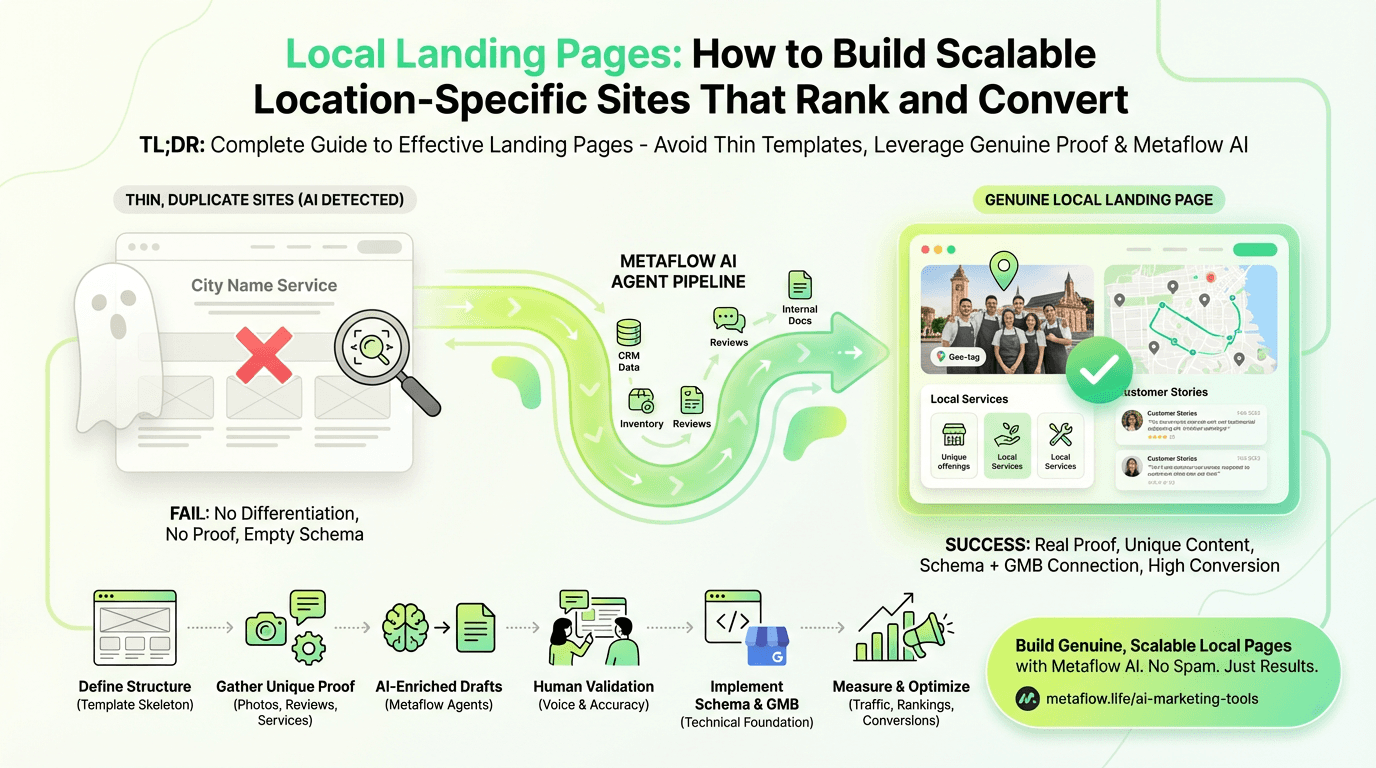
TL;DR: Complete Guide to Effective Landing Pages
Thin, duplicated sites fail because AI models and search engines instantly detect template-generated material with no genuine differentiation
Effective landing pages require real proof: staff photos, location-specific services, customer stories, geo-tagged images, and tangible presence signals
LocalBusiness schema is foundational: Implement proper structured data with complete address, coordinates, hours, and connections to your Google Business Profile
Build scalable templates with unique material: Define consistent structure but fill each landing page with genuine location-specific information, services, and stories
AI optimization done right enriches sites with real information from CRM, inventory, and review systems—scaling quality, not spam
Metaflow AI enables genuine differentiation at scale: Agent-driven pipelines generate drafts enriched with per-location information while maintaining brand consistency
Avoid common mistakes: No fake locations, keyword stuffing, inconsistent NAP information, or neglecting mobile experience and conversion optimization
Measure what matters: Track organic traffic per site, map pack rankings, CTR, conversions, and schema validation status to improve performance and boost results
If you've ever searched for "plumber near me" or "coffee shop in Brooklyn," you've encountered local landing pages. These location-specific websites are the backbone of multi-location businesses' SEO strategies. But here's the problem: most landing page designs fail spectacularly.
They're thin. They're duplicated. And increasingly, AI models can spot them from a mile away.
In 2026, building effective local landing pages isn't just about spinning up hundreds of city service websites with a find-and-replace template. Search engines—and the AI systems powering them—have seen millions of these cookie-cutter examples. They know the patterns. They understand when you're genuinely serving a specific location versus gaming the algorithm.
This guide will show you how to build location-specific sites that avoid thin duplication, implement proper LocalBusiness schema, and leverage AI optimization to create genuine differentiation at scale. Whether you're managing 10 locations or 10,000, you'll learn how to make each website valuable, unique, and discoverable by using modern ai marketing automation platform.
Why Most Location-Based SEO Strategies Fail
Let's be honest: the local SEO playbook hasn't changed much in a decade. Create a template. Swap out city names. Add a map. Ship it.
The result? Thousands of service area sites that look like this:
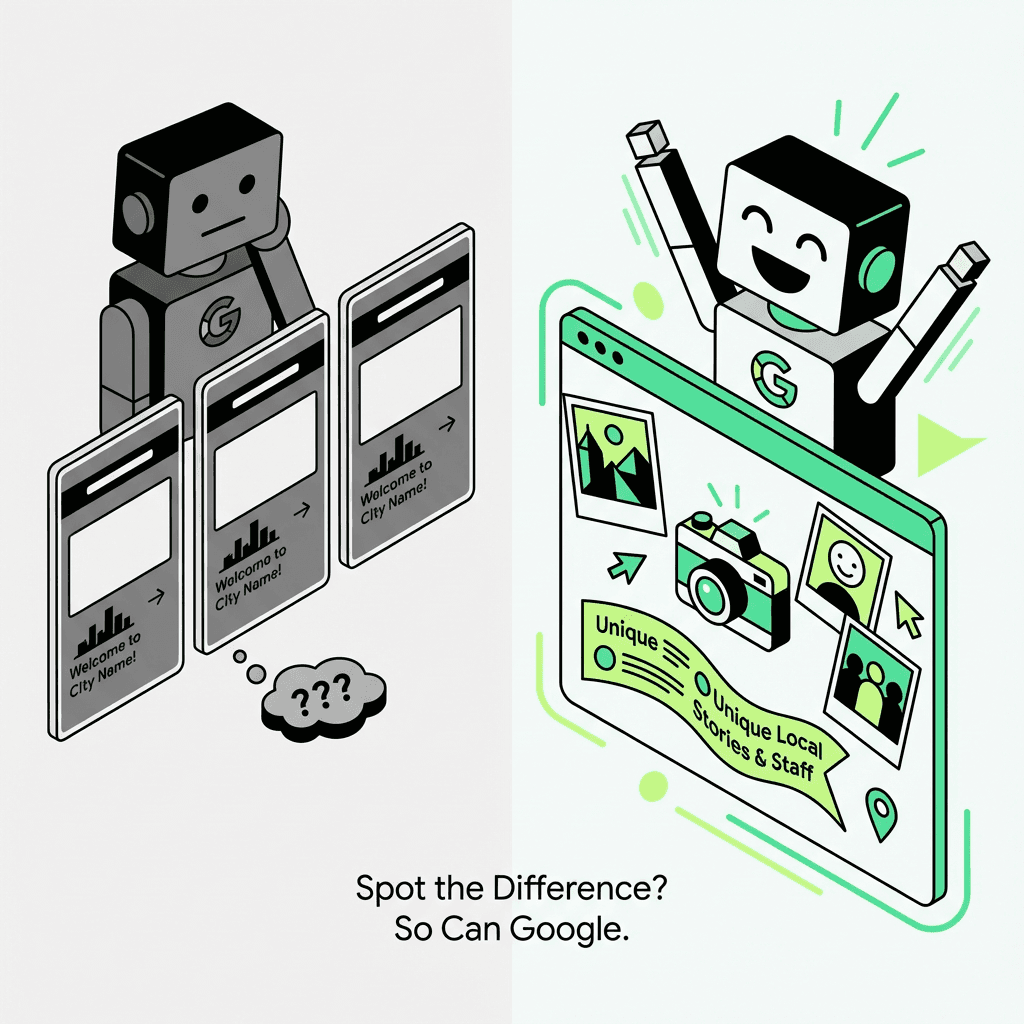
> "Welcome to City Name! We're proud to offer our services to the residents of City Name. Our City Name branch serves City Name and surrounding areas with the best service in City Name."
Sound familiar? These template-generated sites have three fatal flaws:
1. Zero genuine differentiation. If the only thing that changes between your Austin example and your Boston example is the city name, you haven't created unique content—you've created duplicate material with a variable.
2. No proof of presence. Where are the staff photos? The location-specific services? The customer stories from that neighborhood? Without tangible evidence of presence, these sites signal thin material to search engines.
3. Schema without substance. Adding LocalBusiness structured data to a hollow website doesn't magically make it valuable. Schema supports understanding and eligibility—but only when there's something real to understand.
Google's helpful content update, combined with increasingly sophisticated AI detection, has made thin location-based sites a liability. If your near me sites can't answer "why this specific area?" with real evidence, they're not going to rank—even if you use the best marketing ai tools.
The New Standard: Sites That Deserve to Rank
High-performing city service websites in 2026 share common characteristics. They're not just optimized—they're genuinely useful.
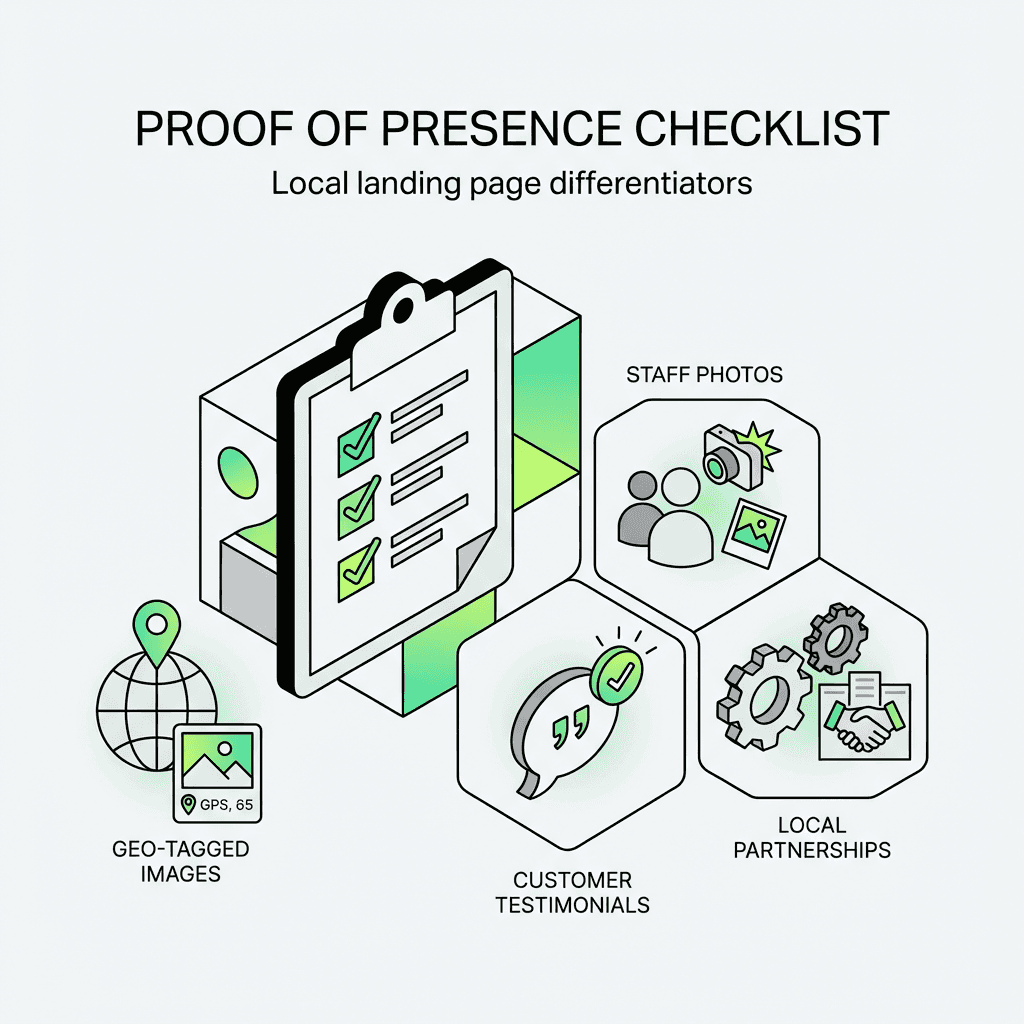
Real Presence Signals
The best location-based sites prove they represent actual areas with:
Staff profiles and photos. Real people who work at or service that area.
Location-specific services or inventory. What's unique about this branch? Special equipment? Exclusive offerings?
Customer stories and testimonials. Reviews and case studies from people in that target audience.
Partnerships and community involvement. Sponsorships, events, business relationships.
Geo-tagged images. Photos actually taken at or near the site.
These aren't SEO tricks—they're proof of genuine presence. And that's exactly what search engines are looking for, especially as ai agents for marketing become more advanced.
Proper Information Architecture
Your site structure should make sense for both users and crawlers:
Each level adds context. Each destination serves a purpose. State hubs can aggregate city destinations. City destinations can list specific service areas or neighborhoods.
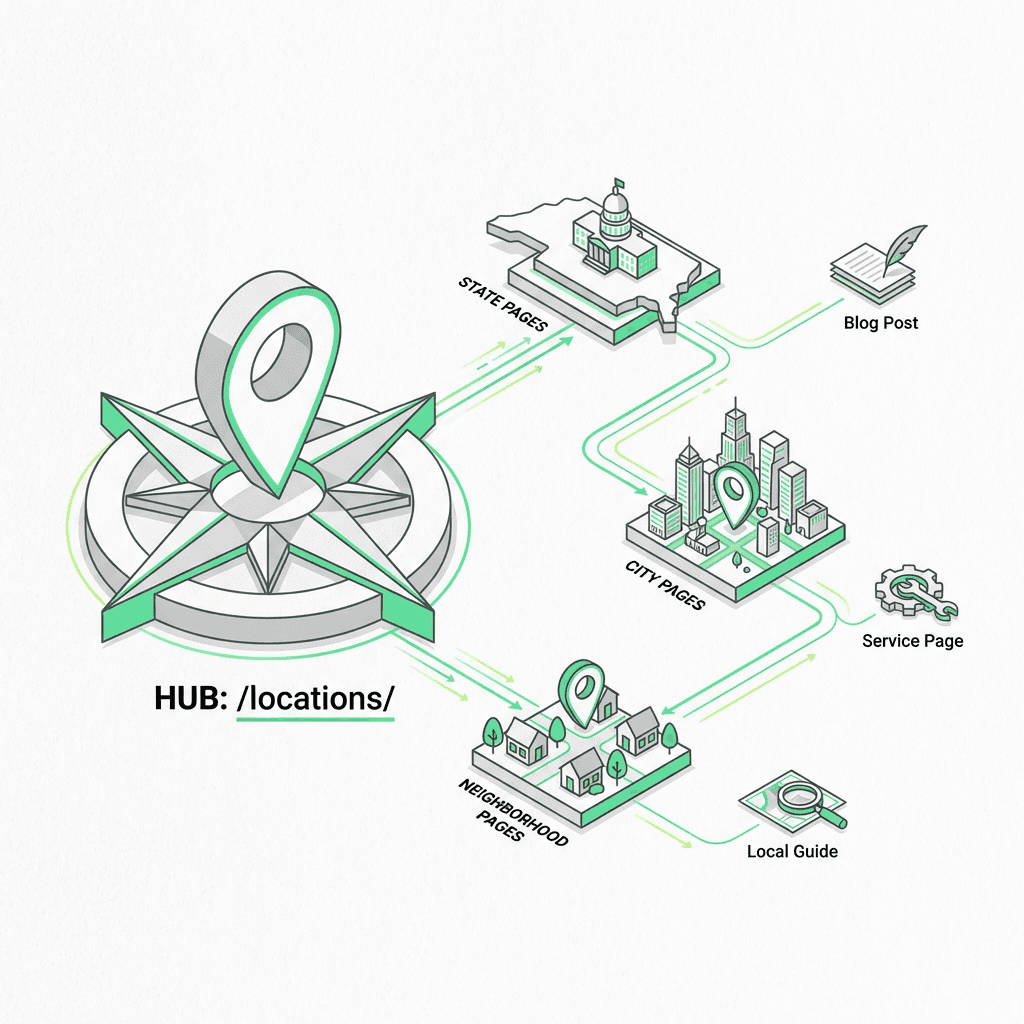
Strategic Internal Linking
Connect your location-based sites to:
Your main service offerings (bidirectional)
Your Google Business Profile (if applicable)
Related destinations (nearby cities, same state)
Relevant blog material about that region
This creates a semantic web that helps search engines understand your footprint and can be streamlined with ai workflow automation.
LocalBusiness Schema: The Technical Foundation
Structured data isn't optional—it's the language that tells search engines "this is a real place with real services."
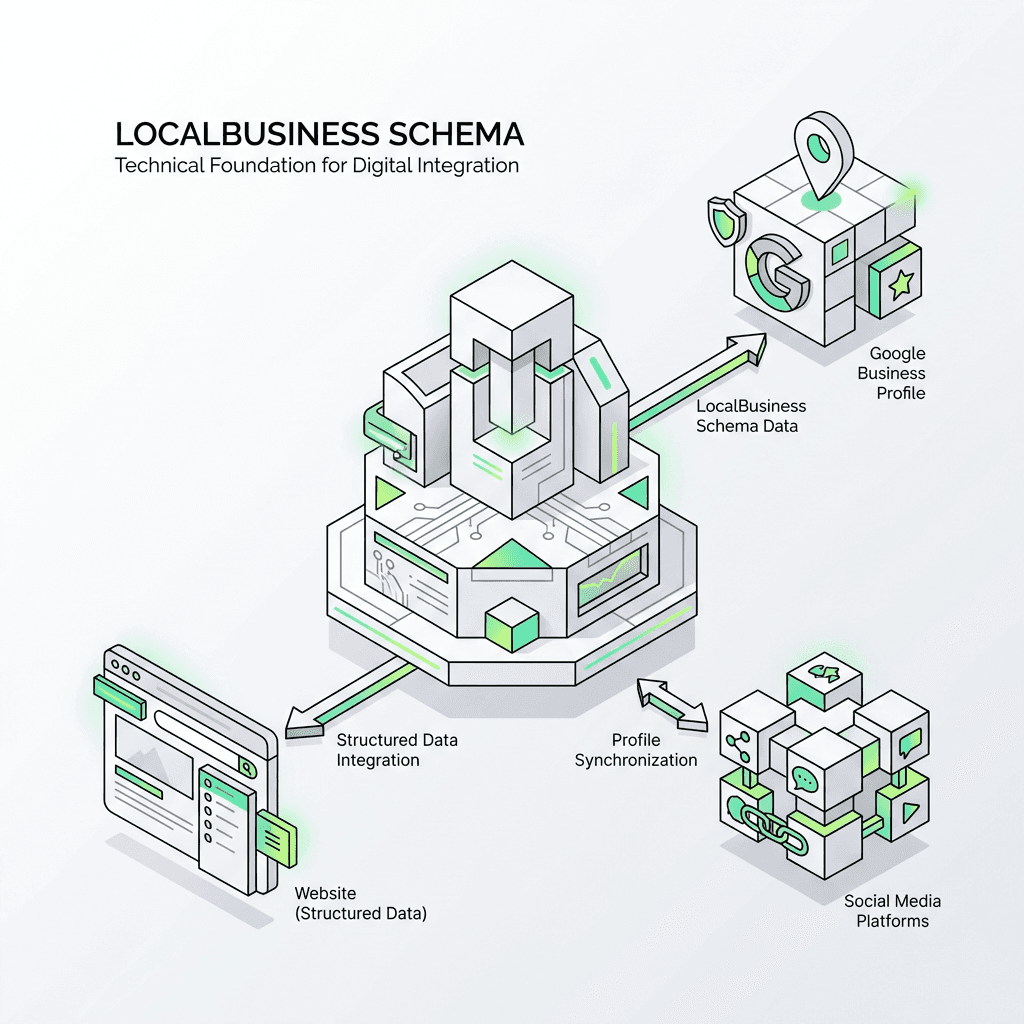
Basic LocalBusiness Markup
Here's the foundational schema for a landing page:
This markup establishes the basics: where you are, when you're open, how to contact you, and can be generated efficiently with an ai workflow builder.
Enhanced Schema for Service Businesses
If you serve an area but don't have a physical storefront, use `areaServed`:
For service areas where you dispatch to customers rather than having them visit you, this structure is more accurate than pretending you have storefronts everywhere.
Connecting Schema to Your Google Business Profile
If you have a verified Google Business Profile, include the `sameAs` property:
This creates a clear entity connection, helping search engines understand that your website, your GMB listing, and your social profiles all represent the same business entity.
Tactical Steps: Building Your Landing Page Template
Let's walk through the practical process of creating location-based sites that scale without becoming spam.
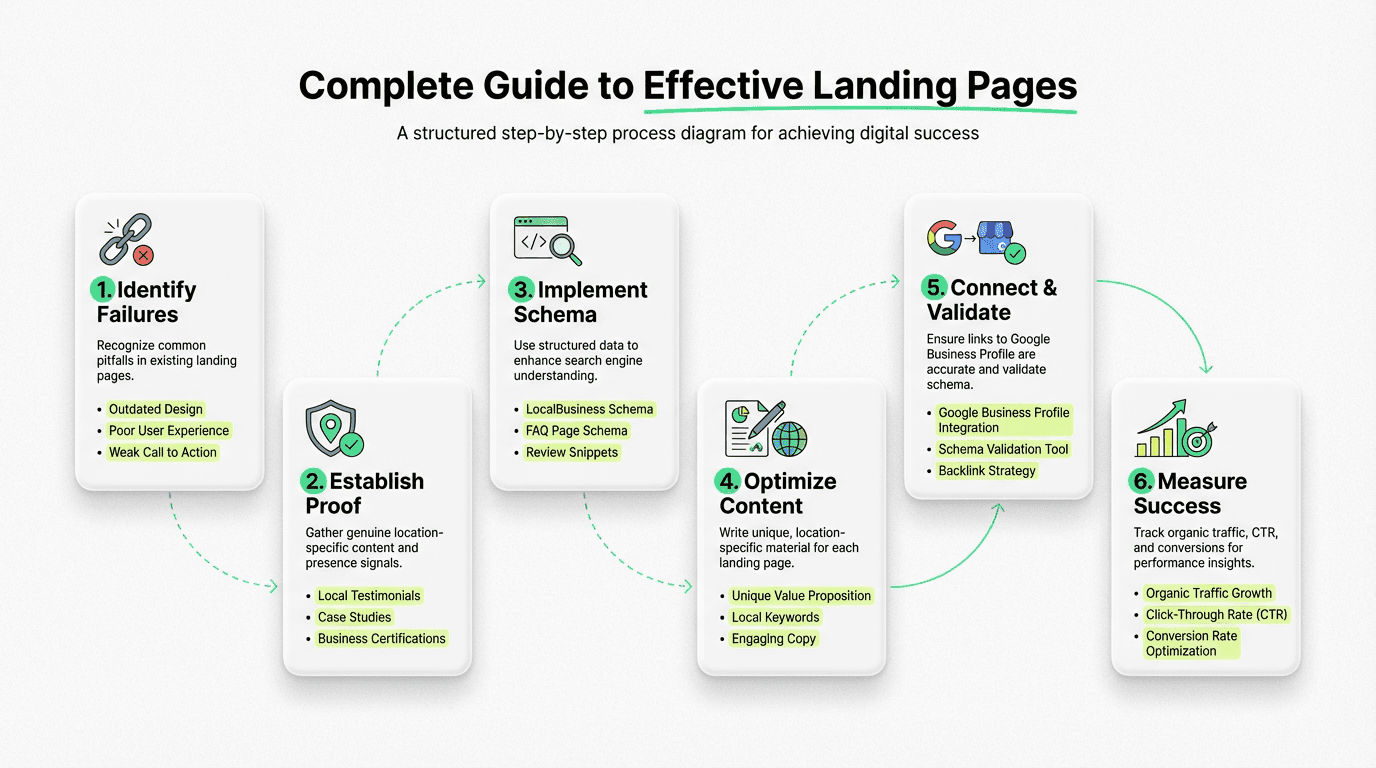
Step 1: Define Your Template Structure
Your template is the skeleton—it should be consistent but flexible enough to accommodate unique material. Using a no-code ai workflow builder can help you iterate quickly and keep templates consistent.
Required elements:
H1 with primary keyword + area
Unique introductory paragraph (150+ words)
Location-specific service offerings
Staff or team section (with real photos)
Customer testimonials/reviews from that target audience
Embedded map
Contact information
LocalBusiness markup
Internal links to related destinations
Variable elements:
Location-specific images
Unique service descriptions
Market insights
Neighborhood/community information
Special offers or promotions
Step 2: Gather Unique Proof for Each Site
This is where most companies fail. They build the template but never fill it with genuine material.
For each destination, collect:
Photos of the actual site, team, or service vehicles
Staff bios (even brief ones)
Customer reviews mentioning that specific area
Service history or specializations for that region
Partnerships or community involvement
Inventory or service variations unique to that branch
If you can't discover unique elements for a destination, ask yourself: should this area have its own landing page? Maybe a state-level or regional destination makes more sense.
Step 3: Write Location-Specific Material
Use your template structure, but write unique material for each destination. Focus on:
Context: "Our Austin team specializes in older home plumbing systems common in Hyde Park and Clarksville neighborhoods."
Specific services: "The Austin branch is our only site with a dedicated grease trap cleaning service, serving the city's restaurant district."
Real stories: "Last winter, we helped 47 Austin homeowners prevent frozen pipe damage during the unexpected freeze."
This isn't keyword stuffing—it's genuinely useful information that happens to include modifiers naturally. AI agents can help gather and structure this information to speed up creation.
Step 4: Implement and Validate Schema
Add your LocalBusiness markup to each destination and validate it:
Use Google's Rich Results Test (search.google.com/test/rich-results)
Check for errors or warnings
Verify all required properties are present
Ensure coordinates match the actual site
Schema errors can prevent your sites from appearing in search features, so this step is critical.
Step 5: Connect to Your Google Business Profile
If you have physical locations with GMB listings:
Ensure your website URL in GMB matches your landing page URL
Keep NAP (Name, Address, Phone) consistent across both
Use the same business name format
Link from your destination to your GMB listing (if public URL available)
This entity alignment strengthens search signals significantly, and can be managed within an ai marketing workspace.
How AI Is Changing Landing Page Design
Here's the uncomfortable truth: AI models detect template-generated "near me" sites instantly. They've been trained on millions of them.
Google's algorithms, powered by increasingly sophisticated language models, can identify patterns that signal low-quality scaled material:
Repetitive sentence structures with only names changed
Lack of location-specific entities and relationships
Missing proof of genuine presence
Schema markup on destinations with no substantive material
AI-generated thin sites are the textbook example of scaled abuse. The same technology that makes it easier to create hundreds of destinations also makes it easier for search engines to identify and devalue them.
But here's the opportunity: AI optimization done right can actually improve landing page design by leveraging ai workflows for growth.
The Right Way to Use AI for Landing Pages
Instead of using AI to generate complete sites from templates, use it to:
1. Enrich sites with real information. Pull location-specific details from your CRM, inventory systems, review platforms, and internal databases. AI can synthesize this information into readable material.
2. Identify differentiation opportunities. AI can analyze your existing data to discover what makes each branch unique—service patterns, customer demographics, seasonal trends.
3. Maintain consistency with uniqueness. AI can ensure your brand voice and structure remain consistent while varying the actual material based on real information.
4. Scale quality, not spam. The goal isn't to create more destinations faster—it's to create better sites efficiently.
The Metaflow Advantage: AI Agents for Genuine Differentiation
This is where modern AI marketing tools change the game entirely.
Traditional approaches force you to choose: scale or quality. Templates give you scale but sacrifice uniqueness. Manual creation gives you quality but doesn't scale.
Metaflow AI offers a third path: an automation platform that generates landing page drafts enriched with real per-location information.
How a Metaflow Pipeline Works
Imagine an ai agent builder that:
Pulls real information from your internal databases, Google My Business API, review platforms, and inventory systems
Identifies unique elements for each destination—service patterns, staff details, customer feedback themes
Generates drafts that maintain template consistency while incorporating genuine location-specific material
Flags sites that lack sufficient differentiation for human review
Outputs structured material ready for your CMS, complete with proper markup
The AI agents add the unique information. Humans approve the voice and ensure quality. You get genuine uniqueness per destination while maintaining template consistency.
This isn't about gaming search engines—it's about making quality creation scalable. It's about freeing growth teams from the tedious work of manual entry so they can focus on strategy, voice, and optimization using ai productivity tools.
Unlike typical automation stacks that fragment creativity and execution across multiple tools, Metaflow brings both into a unified workspace. It's a natural language agent builder that lets operators ideate, experiment, and then codify those insights into durable, scalable workflows.
For landing pages specifically, this means:
No more choosing between scale and quality
Real differentiation based on actual information
Consistent implementation of LocalBusiness markup
Faster iteration and testing of strategies
The result? Sites that pass both algorithmic scrutiny and human inspection—because they're genuinely useful.
Common Landing Page Mistakes to Avoid
Even with the right strategy and tools, watch out for these pitfalls:
Over-optimization. Stuffing "Austin plumber" into every sentence doesn't help—it hurts. Use modifiers naturally where they make sense.
Fake locations. Creating sites for areas you don't actually serve is a short-term tactic with long-term consequences. Search engines are getting better at detecting this.
Inconsistent NAP information. If your phone number, address, or business name varies across destinations, you're confusing search engines and weakening your entity signals.
Neglecting mobile experience. Most searches happen on mobile. If your landing pages aren't mobile-optimized, you're losing conversions.
Forgetting about conversion. SEO gets people to your landing page—but then what? Include clear calls-to-action, contact forms, and conversion paths.
Setting and forgetting. Sites need maintenance. Update hours, staff changes, new services, and seasonal offerings regularly.
Measuring Success: KPIs for Landing Pages
How do you know if your sites are working? Track these metrics:
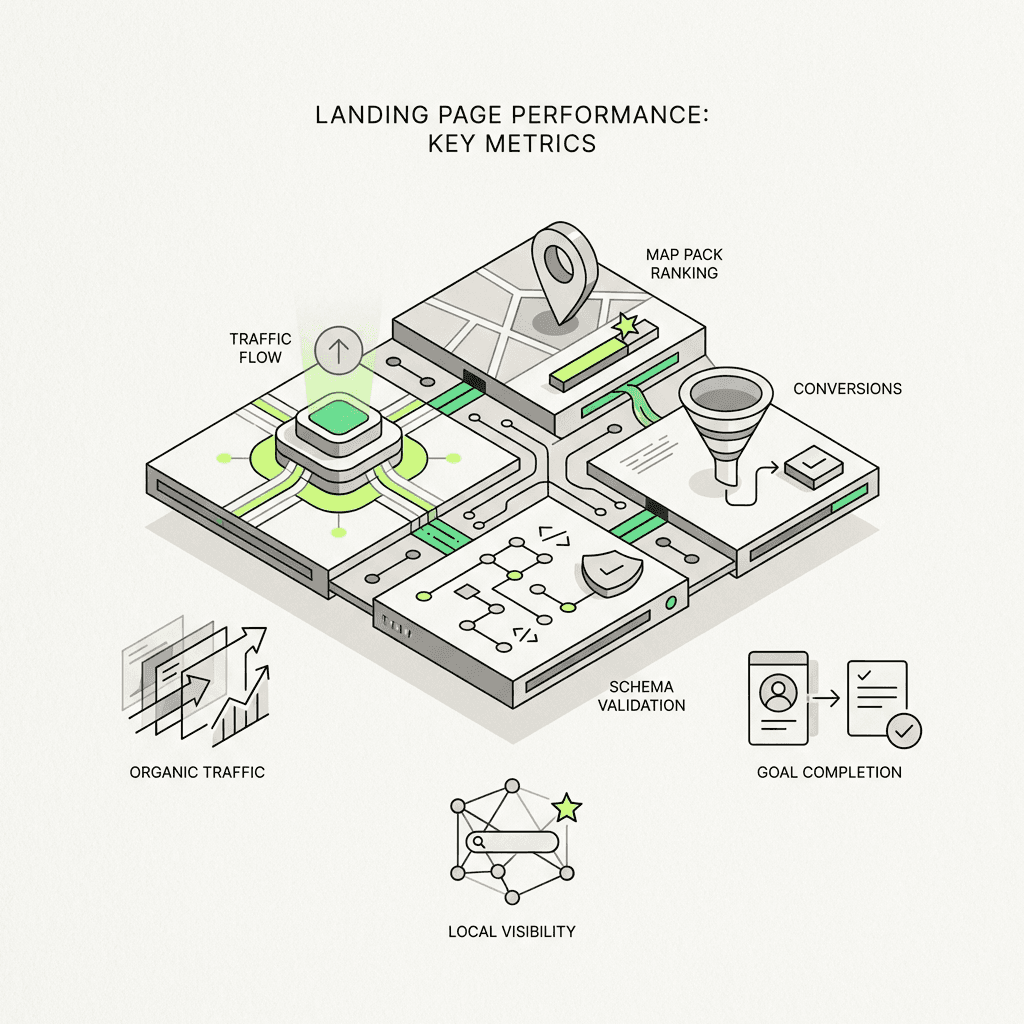
Organic traffic by destination (overall and per-site)
Map pack appearances (track rankings in map results)
Click-through rate from results
Conversion rate (calls, form fills, directions requests)
Engagement metrics (time on site, scroll depth)
Keyword rankings (city + service combinations)
Schema validation status (errors, warnings, successful parsing)
Set up location-specific conversion tracking in Google Analytics and Search Console to understand which destinations drive actual results, not just traffic, and consider integrating these insights into your ai marketing strategy.
The Future: Entity-First, AI-Aware
Landing pages are evolving from keyword-optimized templates to entity-rich, AI-aware experiences.
Search engines increasingly understand locations as entities with relationships—to businesses, services, neighborhoods, and people. Your sites need to reflect this entity-first reality.
That means:
Structured data isn't optional—it's foundational
Genuine presence signals matter more than keyword density
AI detection of thin material will only get more sophisticated
Quality at scale requires intelligent automation, not just templates
The businesses that win in 2026 and beyond will be those that embrace AI optimization as a tool for creating genuine value, not just more destinations.
They'll use platforms like Metaflow to reclaim cognitive bandwidth from tedious production, focusing instead on strategy, differentiation, and customer experience.
They'll understand that landing pages aren't about tricking algorithms—they're about serving real customers in real places with real value, and utilizing best ai tools for marketing.
FAQs
What are local landing pages and why do they matter for SEO?
Local landing pages are location-specific websites designed to target customers searching for services in particular geographic areas. They matter for SEO because they help multi-location businesses rank for "near me" searches and city-specific queries, connecting potential customers with the nearest service provider. Effective local landing pages require genuine location-specific content, proper LocalBusiness schema, and real presence signals to rank in 2026's AI-powered search landscape.
Why do most location-based SEO strategies fail?
Most location-based SEO strategies fail because they rely on thin, template-generated content that simply swaps city names without genuine differentiation. These cookie-cutter sites lack proof of actual presence—no staff photos, location-specific services, or customer stories from that area. AI models and search engines instantly detect these patterns and devalue them, especially after Google's helpful content update made thin location pages a liability rather than an asset.
What is LocalBusiness schema and how do I implement it?
LocalBusiness schema is structured data markup that tells search engines essential information about your physical location, including address, coordinates, phone number, and operating hours. You implement it by adding JSON-LD code to your landing pages with complete details including PostalAddress, GeoCoordinates, and openingHoursSpecification properties. For service businesses without storefronts, use ProfessionalService type with areaServed properties to accurately represent your service area coverage.
What presence signals do effective city service websites need?
Effective city service websites require tangible proof of genuine local presence including staff profiles with real photos, location-specific services or inventory unique to that branch, customer testimonials from people in that area, and geo-tagged images actually taken at the location. Additional signals include local partnerships, community involvement like sponsorships or events, and specific service history or case studies from that market. These aren't SEO tricks—they're evidence that validates your actual presence to both users and search engines.
How can AI optimization improve landing page design without creating spam?
AI optimization improves landing page design by enriching sites with real information pulled from CRM systems, inventory databases, and review platforms rather than generating hollow template content. Tools like Metaflow AI use agent-driven pipelines to identify unique elements for each location, generate drafts with genuine location-specific material, and maintain brand consistency while scaling quality. The key is using AI to synthesize actual data into readable content, not to mass-produce duplicate pages with only city names changed.
What are the most common landing page mistakes to avoid?
Common landing page mistakes include keyword stuffing that forces location terms unnaturally into every sentence, creating fake locations for areas you don't actually serve, and maintaining inconsistent NAP (Name, Address, Phone) information across pages. Other critical errors include neglecting mobile optimization when most local searches happen on mobile devices, forgetting conversion elements like clear calls-to-action, and implementing schema markup on pages with no substantive content. Setting and forgetting pages without regular updates to hours, services, and staff information also undermines performance.
How should I structure my location pages for optimal SEO?
Structure location pages with logical hierarchy using URL paths like /locations/state/city/ that create clear context for crawlers and users. Each level should serve a purpose—state hubs can aggregate city pages, while city pages list specific service areas or neighborhoods. Implement strategic internal linking connecting location pages to main service offerings bidirectionally, related locations like nearby cities, your Google Business Profile, and relevant regional blog content to create a semantic web search engines can understand.
What metrics should I track to measure landing page success?
Track organic traffic per individual location page, not just overall traffic, along with map pack rankings for city-plus-service keyword combinations. Monitor click-through rates from search results, conversion rates including calls and form fills, and engagement metrics like time on site and scroll depth. Set up location-specific conversion tracking in Google Analytics and Search Console, and regularly validate schema implementation status to ensure your structured data parses without errors or warnings.
How do I connect my landing pages to my Google Business Profile?
Connect landing pages to your Google Business Profile by ensuring the website URL in your GMB listing exactly matches your landing page URL and maintaining consistent NAP information across both platforms. Use identical business name formatting and include your GMB profile in the sameAs property of your LocalBusiness schema markup. This entity alignment creates clear signals to search engines that your website, GMB listing, and social profiles all represent the same business, significantly strengthening your local search presence.
What makes Metaflow AI different for creating location-specific sites?
Metaflow AI enables genuine differentiation at scale by using agent-driven pipelines that pull real per-location data from internal systems, identify unique elements for each location, and generate drafts enriched with actual location-specific information while maintaining brand consistency. Unlike traditional template approaches that force you to choose between scale and quality, Metaflow's no-code AI workflow builder allows teams to create genuinely useful location pages efficiently by automating data synthesis while keeping humans focused on strategy, voice approval, and quality control.